 | From this screen you can shop for rooms, furnishings, pins, clothing, posters, and specials. The "Specials" tab, however, is only accessible when in the specified shop ("it's a small world" Imports Specials, Emporium Specials, Golden Horseshoe Mercantile Specials, Inner Space Shop Specials, Shrunken Ned's Shop Specials, Main Street Magic Shop Specials).

Prior to 2 October 2007 the shopping window looked like this:

For more information see shopping. | This button accesses the In-Game Quests. Choose a quest and earn prizes. |
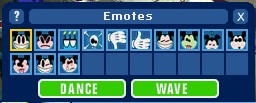
 | Emotes are a fun way to express yourself. Click on the emote that best reflects what you wish to show and that image will show above your character's head.
The emotes are (left to right): Happy, Mad, Cake, Skull and Crossbones, Thumbs Down, Thumbs Up, Grin, Sick, Sleep, Surprise, Disgust, Wink, and Sad
Actions include dancing and waving. Double click to do either action. To stop dancing, double click again. |
Click here to see the emotes in use.
Chat Box | This is where you can type text to chat with other players. See the VMK: Chatting in game section to learn more. |

 | Use this button to access the magic buttons. Read the section on Using Magic Pins to learn more. |


 | This button accesses your Character screen. When you are ready to start editing preferences with regards to your character's clothes, hair style, and skin color, use this button |
 | This button accesses your Preferences screen. From here you can edit your preferences such as sounds, volume, turn on/off trade requests, as well as show how many Hidden Mickey's you have found. |
 | This button accesses both the VMK In-Game Help Guide (this information is also brought up when you click the question mark found on many of the VMK windows) as well as the Call for Help screen. Use the Call for Help option if you need to report a problem within the game. |
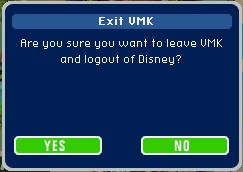
 | Clicking this allows you to exit the screen you are in and quit the game. |
History
As VMK was being promoted before its opening, waiting players found this toolbar on the teaser images:

Icons included: Info, Travel, Stuff, Mail, Emotes, Text, Magic, Camera, Preferences, Help, and Exit.
When VMK opened to the public on 27 June 2005, some button graphics were updated and the Shop button was added:

Icons included: Info, Travel, Stuff, Mail, Shop, Emotes, Text, Magic, Camera, Preferences, Help, and Exit.
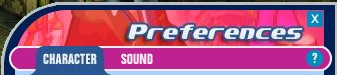
The Preferences button offered two tabs: Character for clothing and message, and sound control.
4 April 2006 introduced the in-game Quest and the Q button was added to the toolbar, sacrificing some of the Text area:

On 2 October 2006 the toolbar was changed again: Preferences was split into Character and Settings. To maximize the Text area, the Exit button was shortened from the word 'Exit' to 'X', the 'Q' button was made noticeably smaller, and all the buttons were tightened up to save space.

|

 . The question mark is found on the top of each window that pops up. Click the Question Mark if you want more information.


