Creating your Car
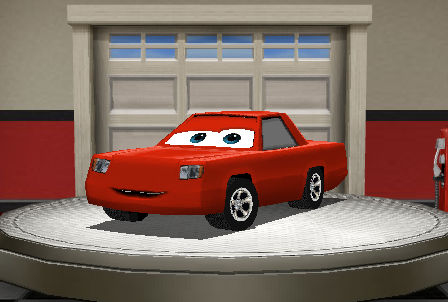 | During this game preview, players have the ability to create one car which they can race with on the test tracks. When you start you will have a randomly created car already on the turn-table, which you can customize and name. |
| During the entire Create you Car process, you will notice a set of buttons in the bottom left corner of the preview. These buttons allow you to change the view of the car you see. The outside buttons allow you to rotate the car on the turn-table, and the inner buttons allow you to switch between a side and top-down view. |  |
Making the Chassis

During the first step of the car making process, you will be given the option of selecting your car's gender and Chassis shape.
Gender
 | Moving from the left side of the Create a Car options to the right, you will first see the option to select your car's gender. The gender determines how your car's eyes look, and nothing more. |
Image:WoC_Create_My_Car_Boy.png | This is the shape of a boy car's eyes.
Image:WoC_Create_My_Car_Girl.png | This is the shape of a girl car's eyes.
Chassis shape
Most of the first step is based around editing the shape of your car's chassis. This feature has two parts, a basic and advanced option. Both these options can be used together to design a car unique to you!
Basic Chassis Options

The basic side of the Chassis editing process allows you to select the different styles of chassis, which can be further edited by using the advanced options feature.
Image: WoC_Create_My_Car_Chassis_Shape_One.png | This shape is achieved by selecting the option on the left.
Image: WoC_Create_My_Car_Chassis_Shape_Two.png | This shape is achieved by selecting the option in the middle.
Image: WoC_Create_My_Car_Chassis_Shape_Three.png | This shape is achieved by selecting the option on the right.
 | If you would like to further edit the shape of your car after you select a basic shape, click the advanced options button. |
Advanced Chassis Options

If you select that option, the pre-made selections will be replaced by a set of sliders. These allow you to select the length and height of certain parts of your car.
 | This slider adjusts the curve on the tail end of your car |
 | This slider adjusts the length of your car behind the back tire. |
 | This slider adjusts the length of your car in front of the back tire. |
 | This slider adjusts the length of the hood of your car. |
 | This slider adjusts the height of the back of your car's roof. |
 | This slider adjusts the height of the front of your car's roof. |
 | If you can't decide on a look you like for your car, you can always use the shuffle |
 | You can also go back to the basic options at any time if you want to change the shape of your car. |
Paint and Details



 During the first step of the car making process, you will be given the option of selecting your car's gender and Chassis shape.

 The basic side of the Chassis editing process allows you to select the different styles of chassis, which can be further edited by using the advanced options feature.

 If you select that option, the pre-made selections will be replaced by a set of sliders. These allow you to select the length and height of certain parts of your car.


