PH Edit My Profile Tag.png

Changing your "My Fairy Page"
Change Your Page

The "My Fairy Page" shows other fairies information about your fairy. For information, visit My Fairy Page.
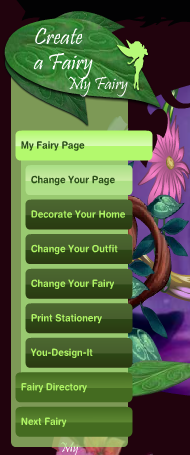
Editing your "My Fairy Page" couldn't be simpler. To start customizing your "My Fairy Page", look at the directory on the left and click "Change Your Page".

Sections

When editing your profile, you'll notice that it is split into 7 sections, My Profile, My Activities, My Music, My Icon, My Quiz, My Poll, and My Page Color. Each one is explained a bit more below.

My Profile

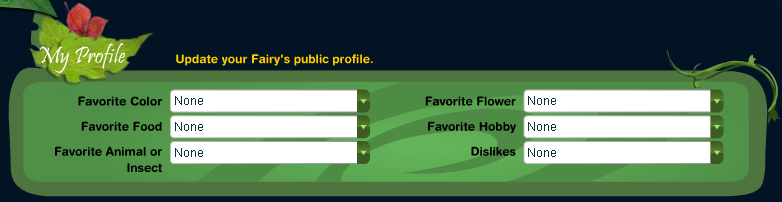
Your profile is the first thing besides your home itself that can be seen on your "My Fairy Page". This section displays some of your fairy's favorites such as Color, Food, Animal or Insect, Flower, and Hobby. Also displayed here is your fairy's top dislike. When updating your "My Profile" section, you can only choose from the provided premade options. To set your favorites and dislikes, simply open the dropdown menu and choose the one you want. Update Your Profile
Section nameChoices
Favorite Color
  • None (default)
  • Berry Blue
  • Berry Red
  • Chestnut Brown
  • Chocolate Brown
  • Cloud White
  • Dolphin Blue
  • Fairy Dust Yellow
  • Forest Green
  • Foxtail Orange
  • Fresh Lavender
  • Goldfish Orange
  • Grizzly Brown
  • Lemon Yellow
  • Lightning Blue
  • Lime Green
  • Midnight Black
  • Pale Goldenrod
  • Pale Orchid
  • Panther Black
  • Rabbit Grey
  • Roasted Almond
  • Rose Red
  • Royal Purple
  • Sandy Brown
  • Sea Green
  • Sky Blue
  • Snow White
  • Spring Violet
  • Starshine White
  • Summer Blush
  • Sunset Orange
  • Sunshine Yellow
  • Waterfall White
  • Winter Blush
  • Wolf Grey
Favorite Food
  • None (default)
  • Acorn Pancakes
  • Ambrosia Salad
  • Anything Sweet!
  • Apple Popovers
  • Berry Parfaits
  • Blueberry Pie
  • Blueberry Trifle
  • Bonbons
  • Carrot Cupcakes
  • Cheesecake
  • Chocolate Cake
  • Cinnamon Scones
  • Cinnamon Spice Cake
  • Cranberry Crumble
  • Everfruit
  • Fairy Cake
  • Fairy Macaroons
  • Fairy Toast
  • Gingerbread
  • Hazelnut Soup
  • Lemon Tarts
  • Ollallaberry Pie
  • Petit Fours
  • Poppy-puff Rolls
  • Puff Pastries
  • Pumpkin Muffins
  • Raspberries
  • Rhubarb Pie
  • Rose Petal Teacakes
  • Strawberries
  • Sunflower-seed Souffle
  • Tea and Cookies
  • Watermelon Ice
Favorite Animal or Insect
  • None (default)
  • Bear
  • Bluebird
  • Bumble Bee
  • Bunny
  • Butterfly
  • Caterpillar
  • Chipmunk
  • Dolphin
  • Dove
  • Dragonfly
  • Flying Fish
  • Fox
  • Frog
  • Goldfish
  • Hummingbird
  • Ladybug
  • Mole
  • Monkey
  • Moth
  • Mouse
  • Nightingale
  • Owl
  • Pony
  • Seahorse
  • Spider
  • Squirrel
Favorite Flower
  • None (default)
  • Buttercup
  • Cactus
  • Carnation
  • Daisy
  • Dandelion
  • Delphinium
  • Foxglove
  • Geranium
  • Honeysuckle
  • Hyacinth
  • Iris
  • Lilac
  • Lily
  • Lupine
  • Marigold
  • Orchid
  • Pansy
  • Rose
  • Silverbell
  • Sunflower
  • Tulip
  • Water Lily
Favorite Hobby
  • None (default)
  • Baking Fairycake
  • Dancing
  • Daydreaming
  • Drawing pictures
  • Exploring
  • Fairy Tag
  • Flying
  • Flying -- fast!
  • Helping animals
  • Hide-and-seek
  • Making Friends
  • Making Jewelry
  • Making New Clothes
  • Painting Pictures
  • Pixie-dusting
  • Planting Seeds
  • Playing Music
  • Practical Jokes
  • Racing
  • Shopping
  • Singing
  • Singing -- loud!
  • Telling Stories
Dislikes
  • None (default)
  • Arguing
  • Bad hair days
  • Being bored
  • Bossyboots
  • Cheaters
  • Cloudy days
  • Dark places
  • Eavesdroppers
  • Feeling left out
  • Gossips
  • Hawks
  • Know-it-alls
  • Meanies
  • Neat freaks
  • Phonies
  • Rainy days
  • Sad endings
  • Show-offs
  • Slobs
  • Thunderstorms
  • Waking up early
  • Waking up late
  • Weeds


My Activities

My Activities

Despite the fact that your selected activities are displayed in the "My Profile" section of your homepage, the area where this information can be changed appears as a separate section section on the edit page. You can choose 3 activities from the list provided to be displayed on your "My Fairy Page". To select an activity, simply open the dropdown list and click on the one you want.


Activities
  • None (default)
  • Pixie Hollow Tour
  • Hopeful's Quest
  • Sundown Countdown
  • DisneyFairies.com home page
  • Beck's page
  • Bess's page
  • Fira's page
  • Lily's page
  • Prilla's page
  • Rani's page
  • Vidia's page
  • Tinker Bell's page
  • Fawn's page
  • Iridessa's page
  • Rosetta's page
  • Silvermist's page
  • Fairy Mary's page
  • Fairy Dust and the Quest...
  • The Trouble with Tink
  • Vidia and the Fairy Crown
  • Lily's Pesky Plant
  • Beck and the Great Berry Battle


My Music

My Music isn't a visible section of your "My Fairy Page", but instead the music you choose here plays in the background. Each piece of music reflects a certain feature of nature, such as a peaceful river or a summer's breeze. To listen to one, simply select it from the drop down list and click preview. Then choose the one you want to use as the music for your "My Fairy Page"

PH Profile Edit My Music.Png

Music
  • None (Default)
  • Morning Dew
  • Evening Shade
  • Whispering Meadow
  • Babbling Brook
  • Fairy Garden
  • Autumn Breeze
  • Wooden Glen
  • Forest Stream


My Icon

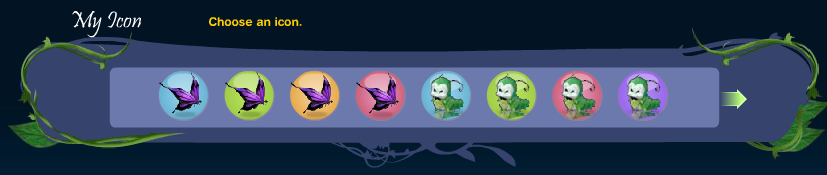
The icon you select shows up at the top of your page, next to your Fairy's name and address. This icon is also seen when you leave other fairies messages and next to your fairy's name when it appears on somebody's Friends List. There are 8 different icons to choose from, and each icon is available in 4 different colors as is shown below. To set one of these as your icon, simply click on it.
Change Your Icon
Set 1Set 2Set 3Set 4Set 5Set 6Set 7Set 8
Butterfly
Butterfly
Butterfly
Butterfly
Caterpillar
Caterpillar
Caterpillar
Caterpillar
Flower
Flower
Flower
Flower
Ladybug
Ladybug
Ladybug
Ladybug
Sprout
Sprout
Sprout
Sprout
Wave
Wave
Wave
Wave
Beanstalk
Beanstalk
Beanstalk
Beanstalk
Lilypad
Lilypad
Lilypad
Lilypad

My Quiz

PH Profile Edit My Quiz.Png

On your "My Fairy Page", a quiz is shown on the right side underneath the poll. To choose which quiz is displayed, simply go to the "My Quiz" section and select the quiz you want from the drop down list.

}
Quizzes
  • Fairy Magic Quiz
  • Fairy Fashion Quiz
  • Fairy Bug Quiz
  • Fairy Forecast Quiz
  • Fairy Competition Quiz
  • Feathered Friends Quiz
  • Fairies Friends Quiz
  • Adventurous Animal Quiz


My Poll

PH Profile Edit My Poll.Png

On your "My Fairy Page", the quiz is shown on the right side, next to the "My Profile" section. To select a poll, just pick one from the drop down list.

}
Polls
  • Favorite Food
  • A Day in Pixie Hollow
  • Fairy Page Activities
  • Favorite Fairy Game
  • Favorite Time of Day
  • Favorite Season
  • Meet in Pixie Hollow
  • Explore Never Land
  • Never Land Treasure
  • Being a Fairy


My Page Color


My Page Color
"My Page Color" is a key feature of your "My Fairy Page", since it provides the base for everything displayed on your page. To pick choose a color for you page click on it. Use the green arrows on either side to scroll through all your options.

My Page Color Options

PH My Page Color 1.PngPH My Page Color 2.PngPH My Page Color 3.Png
PH My Page Color 4.PngPH My Page Color 5.PngPH My Page Color 6.Png
PH My Page Color 7.Png

Finishing up

When you're finished filling out the areas and are happy with how you have customized your page, click the save button. If you aren't completely happy with how your page looks, don't worry, you can go back and change things again.

PH Profile Save Button.Png

Tink's Tips: Edit My Profile


Tink's Tips


PH Profile TinksTip 1.Png
Referenced by 2 pages pages that link to “Pixie Hollow Pre-Beta: Edit My Profile” — its place in the wiki
